
Kubernetes SSO using Keycloak
The purpose of this project is to test Keycloak using federation with an external LDAP.

The purpose of this project is to test Keycloak using federation with an external LDAP.
Keycloak logo
The SSO solution is based on Keycloak, but will also use:
- OpenLDAP as external storage for identities
- OAuth2 Proxy that provides authentication for unsecured applications
This article is based on this Github repository.
Installation
Kubernetes cluster setup
Before installing the SSO solution, we need to get a Kubernetes cluster with NGINX Ingress controller and cert-manager installed. Let’s Encrypt will be used for certificates management.
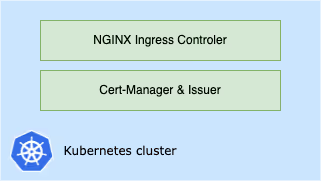
A Kubernetes cluster with ingress controller and cert-manager
You can use any Kubernetes solution, but you need to have a public domain that points to the entry point of your cluster.
Step-by-step installation documentation.
Install the SSO components
We are going to install and configure the tools that will compose the SSO solution: Keycloak, OpenLDAP and Oauth2 Proxy.
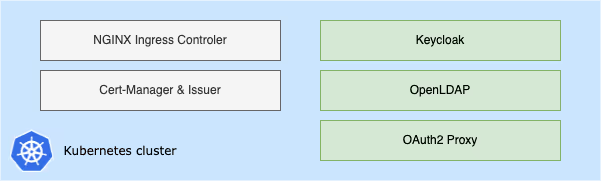
Components of the SSO solution
Step-by-step installation documentation.
Identification process
Here is an overview of the process when a client access the secured application for the first time, before being authentified:
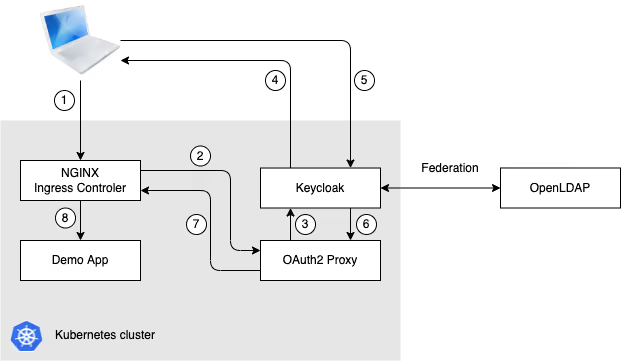
SSO process overview
- Customer requests the demo app
- Ingress controller redirect to OAuth2 Proxy according annotations in the demo app ingress
- OAuth2 Proxy checks with Keycloak if the user is authenticated
- The user is not identified, Keycloak presents the login page
- The user fills in his credentials for authentcation
- Keycloak passes identification datas to OAuth2 Proxy
- OAuth2 Proxy informs Ingress Controller that the user is identified and is authorized to access the application
- Ingress controller routes the request to the demo app
Some tests
Deploy a secured application
Now we have a SSO solution ready to use, we are going to deploy a first secured application.
We use NGINX as demo application to check if the SSO solution, including OAuth2 Proxy, is working well. In this example we want that users login with Keycloak before they can access the welcome page of NGINX.
Step-by-step installation documentation.
Then check that the demo application is secured, when you want to access it:
- You get the Keycloak login page if your are not already identified
- You can directly access the demo app if you are already identified
Deploy a unsecured application
In the previous test, we saw that we secure an application through ingress annotations.
So, even if OAuth2 Proxy is installed, we can still deploy unsecured applications in the cluster.
Simulate failure in federation
What happens if OpenLDAP goes down and the federation doesn’t work anymore ?
Let’s see if we can continue authenticating to Keycloak and accessing the secured application.
Conclusion
It is a good introduction about how to build a SSO solution based on Keycloak in Kubernetes.
I will try to add some tests to study new use cases. But there is a lot of other configuration and features available, I need to spend more time to study everything in depth.
By the way, if you have any idea or suggestions to improve this demonstrations, please write them in comment.
Initialement publié sur Medium.
