
On-Premise load balancing solution
It is very easy to create load balancers when working on public clouds. But this facility is not available when you are on a private cloud
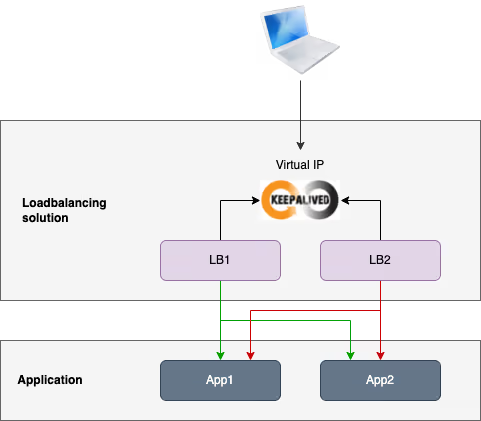
It is very easy to create load balancers when working on public clouds. But this facility is often not available when you are on a private cloud, unless you have an appliance like F5 for example.
Here is an example of load balancing and high-availability solution built with HAProxy Community Edition and Keepalived.
Create the lab
We start by provisioning the lab. I use Multipass to create the VMs but you can use any other solution if you prefer.
Application is a webapp deployed on VM for the lab, but it can be anything else: a containerized application, the kubernetes api controller, etc. HAProxy is able to deal with any TCP flow.
Install demo application
First we need to install a web application on the two app nodes. The load balancing solution will distribute requests to these servers. We will rely on the NGINX welcome page for the demo application. In real life, it could be any application or API.
Install HAProxy
Now we begin to install the first component of our load balancing solution: HAProxy.
At this step, if you send multiple requests to one of the lb nodes, you will see that HAProxy is load balancing these requests on both app nodes.
Install Keepalived
Now we are going to use Keepalived in order to create a virtual IP that represents the unique entrypoint of the load balancer cluster.
Now, you must be able to ping the virtual IP representing the load balancer cluster entrypoint. All requests sent to this virtual IP are sent by default to the master lb node, which then distributes traffic to the two app nodes.
Now we can make few tests on the load balancing solution.
Load balancer failure
We can test the resilience of the load balancer cluster when the MASTER lb node is going down.
See how the virtual IP is attached to the MASTER node by default, but is attached to the BACKUP node as soon as the first one fails.
App server failure
We will simulate the failure of one of the app node and check that HAProxy stop sending requests to it to avoid HTTP error for the customer.
Load
Let’s generate some load to see how the load balancer performs. For that I use ab with the following configuration:
- Concurrency: 50
- Requests: 300 000
Here is the results of this tests:
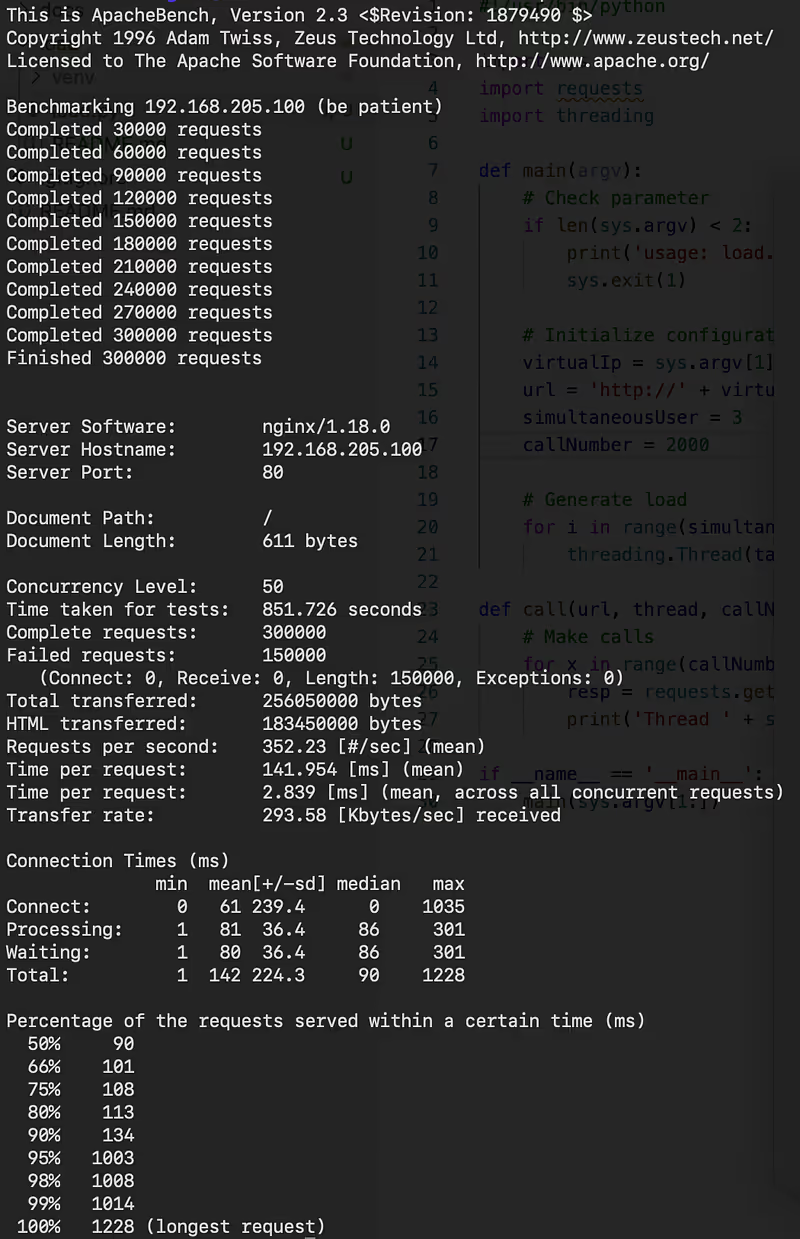
Statistics of the load test
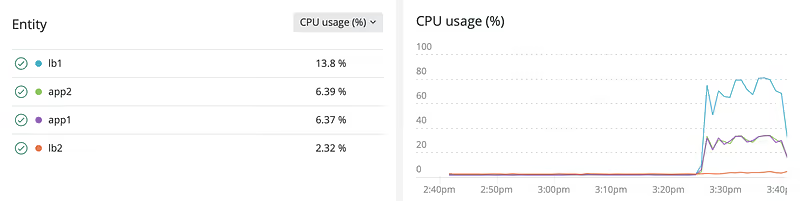
CPU curves of all nodes during the load test
What we can note:
- The load balancing solution works !
- It works well whereas the size of VMs is small (1 core, 512 Mb of RAM)
- Curve of both app servers are pretty identical, so the load balancer has well distributed the load
- The lb
MASTERnode took all the load, theBACKUPnode remained quiet
Conclusion
We have built a fully operational load balancing and High Availability solution for our 2 app nodes.
- You can scale the app backend adding new nodes, you just have to adapt the HAProxy configuration.
- You can also scale the load balancer cluster adding new lb nodes with the same Keepalived configuration.
You may have to create multiple instances of load balancing solution if:
- You want to have different expositions
- You want to use the same ports several times
There is a lot of additional features in HAProxy and Keepalived you may be interested in, check their documentation for more details.
You can find all the sources in this GitHub repository.
Initialement publié sur Medium.
